
Conceptual Pre-Configuration Information
It is important to understand that SafeKey operates using two core web portals, each serving a distinct purpose.
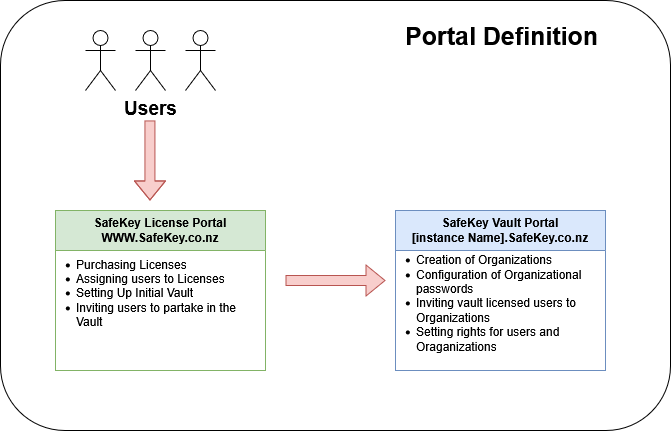
SafeKey Licence Management Portal
The SafeKey Licence Management Portal is used to create users and assign licences. A user licence must be assigned and accepted before a user can access the SafeKey Vault.
This portal is available at: https://www.safekey.co.nz
SafeKey Vault Portal
The SafeKey Vault Portal is where organisations are configured, and user access rights are managed. Within a single vault, you can create multiple organisations, each with its own permissions and password-sharing structure.
This portal is available at: https://[YourInstance].safekey.co.nz
The Role and Importance of SafeKey Administrators
A SafeKey Administrator is the individual within your organisation who controls access to passwords. Administrators can view, manage, and update stored credentials as required.
If your business uses multiple organisations within SafeKey, each organisation can have its own designated administrator.
Administrators typically:
- Perform the initial setup of the organisation
- Import or save existing passwords (including migration from web browsers, if required)
- Assign access rights to users or groups
We often recommend that administrators use SafeKey for a short period before inviting other users. This allows time to become familiar with the platform and to ensure key passwords and access structures are in place before wider rollout.
Adding New Users to the SafeKey Service
Adding a new user to SafeKey is a two-step process.
Step 1: Assigning a Licence
The user must first be assigned a SafeKey licence. This is done by sending an invitation, which the user must accept. Once accepted, the licence grants the user access to the SafeKey Vault.
At this stage, the user can store their own personal passwords, but does not yet have access to any shared business passwords.
Step 2: Adding the User to an Organisation
The second step is to add the user to one or more organisations. This is also completed via an invitation and acceptance process.
Once the user accepts the organisation's invitation, they gain access to shared corporate passwords and resources, depending on the permissions assigned.